

Product Description
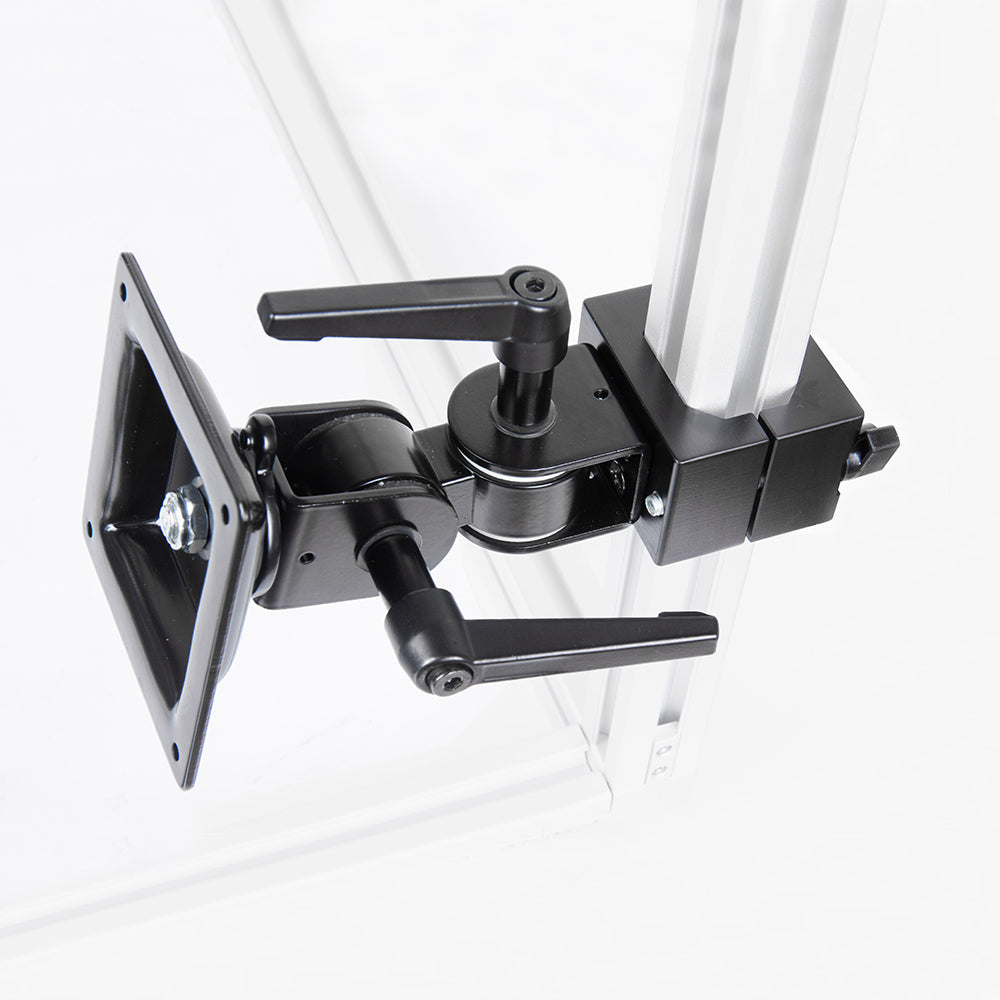
The KR SightLink E3040 Square Tube Coupler Monitor (VESA) Mount is the rigid way to put an industrial monitor on an extrusion machine frame: a clamp coupler wraps around the 30x30 or 40x40 profile - one coupler body fits both sizes - and a dedicated VESA monitor arm extends out to carry the screen.
Where the knuckle-arm screen kits are built around fast re-aiming, this one is built around staying put. The coupler clamps the profile as a collar - a bolted, full-wrap grip rather than a friction ball joint - and the VESA arm is a fixed component of the set, matched to the coupler's bolt-on interface. Set the screen's position and angle at installation, and that is where the screen lives.
The monitor bolts to the arm's VESA plate with standard VESA screws. The monitor itself is chosen separately, so you use the display your line already standardizes on.
Why SightLink
A monitor that lives on a production frame should be mounted like part of the frame - clamped around the structure, not balanced on an adjustable arm. The square tube coupler gives the screen that installed-equipment mounting, on the extrusion you already own, without drilling or welding the profile.
It comes from the same coupler series SightLink uses to build rigid offsets from extrusion frames: one clamp body, different bolt-on outputs. Here the output is a VESA monitor arm, so the station's display gets the same treatment as its structural hardware - and because the coupler clamps rather than drills, it still moves with the frame when the layout changes.
How It Mounts
This kit is the complete link from frame to screen - the coupler clamps your 30x30 or 40x40 extrusion and the VESA arm carries your monitor's bolt pattern, both included:
One coupler body clamps both 30x30 and 40x40 profiles, so the same kit serves a compact inspection cell and a full-size 4040 frame. The VESA arm ships as part of the set, already matched to the coupler's bolt-on interface - there is nothing to adapt or improvise between clamp and screen.
Coupler Arm or Knuckle Arm?
Choose this kit when the screen's home is settled - a resident display on a working cell, clamped rigid. Choose the SightLink E3040 Monitor (VESA) Mount when the screen is still being repositioned often - its knuckle arm and ball head make re-aiming a two-knob adjustment. They are complementary: dial in the station with the adjustable kit, install the settled screen with this one.
For tablets instead of monitors, the SightLink E3040 Tablet Mounts carry 7-12.9 in screens on the knuckle arm. On a freestanding 35 mm post frame, use the VisionFrame 35 Monitor (VESA) Mount.
Load and Rigidity
Rigidity is the reason this kit exists: a full-wrap clamp on the profile and a bolted arm to the screen, with no friction joints between frame and monitor to creep out of angle. The monitor load rating is still pending confirmation, so do not specify this kit for a final installation until KUPO confirms the screen weight and VESA pattern.
- Frame grip: collar-style clamp around 30x30 or 40x40 extrusion - one body fits both.
- Screen connection: dedicated VESA monitor arm, bolted to the coupler's interface.
- Character: set at installation, holds its position - the fixed-installation sibling of the adjustable VESA kit.
Keep the screen's offset from the frame modest - a monitor on a long lever loads any clamp - and route video and power cables along the extrusion with strain relief so nothing tugs on the screen. Re-check clamp torque after the first days of service, as with any clamped connection on a working frame.
Best Applications
Use the coupler VESA mount where the display is part of the station, not part of the experiment:
- Resident pass/fail display on a working inspection cell.
- HMI screen installed at an operator station on the production frame.
- Fixed monitor for a controller or industrial PC in the cell.
- Stations where an adjustable arm would invite well-meaning re-aiming.
- Frames that get moved: the screen travels with the structure, clamped in place.
What's in the Kit
The kit ships as the square tube coupler and the VESA monitor arm - the arm is a fixed component of the set, matched to the coupler - plus the clamp hardware.
- SightLink E3040 square tube coupler - clamps 30x30 and 40x40 extrusion.
- VESA monitor arm, bolted to the coupler's output interface.
- Clamp fastening hardware.
Not included unless bundled: the extrusion frame, the monitor itself, monitor-specific VESA screws if yours are non-standard, machine guarding, and cable clips or strain-relief hardware.
Before You Order
Before ordering, confirm four things: your frame is 30x30 or 40x40 square extrusion with clear tube length for the coupler, KUPO has confirmed your monitor's VESA pattern and weight for this kit, the screen position keeps clear of moving machinery, and cables can be routed along the frame.
- The coupler wraps the profile, so it needs a clear run of tube - check for T-slot accessories, brackets, or guards where the clamp will sit.
- Ask KUPO to confirm the monitor's VESA pattern and weight before ordering.
- Position the screen clear of moving machinery, door swings, and walkways - it is fixed once installed.
- Plan cable routing with strain relief along the extrusion; a dangling cable is the only moving part left in this setup.
Frequently Asked Questions
Does one kit really fit both 30x30 and 40x40?
Yes - the coupler body is designed to clamp both profiles, so one part number serves your 3030 inspection cells and 4040 frames alike. That also means one spare on the shelf covers every frame in the shop.
Which monitors fit?
Industrial monitors with a standard VESA bolt pattern - check the four threaded holes on the back of yours, and ask KUPO to confirm the pattern and screen weight before ordering.
Can I re-aim the screen after installation?
The point of this kit is that nobody does so casually - there are no friction joints to nudge. Adjusting the screen is a deliberate loosen-and-reset of the clamped connections. If the station still needs frequent re-aiming, use the knuckle-arm VESA kit instead.
Can I buy the VESA arm separately?
No - the arm is a fixed component of this set, matched to the coupler's bolt-on interface. The coupler series pairs one clamp body with defined outputs, and this set is the monitor output.
How does it compare to the knuckle-arm VESA mount?
Complementary strengths: the knuckle-arm kit repositions in seconds and suits screens still finding their place; this coupler kit clamps the frame full-wrap and suits screens whose place is settled. Many cells use the adjustable kit during commissioning and this one for the installed result.
Does it damage the extrusion?
The coupler clamps around the profile rather than drilling it, so the frame keeps its slots and resale shape. As with any clamped joint on a working frame, torque the hardware at installation and re-check it after the first days of service.